Inside the Dual Retrieval System – How ActionBoard Thinks

Rafa Rayeeda Rahmaani
Chief Strategy & Growth Officer
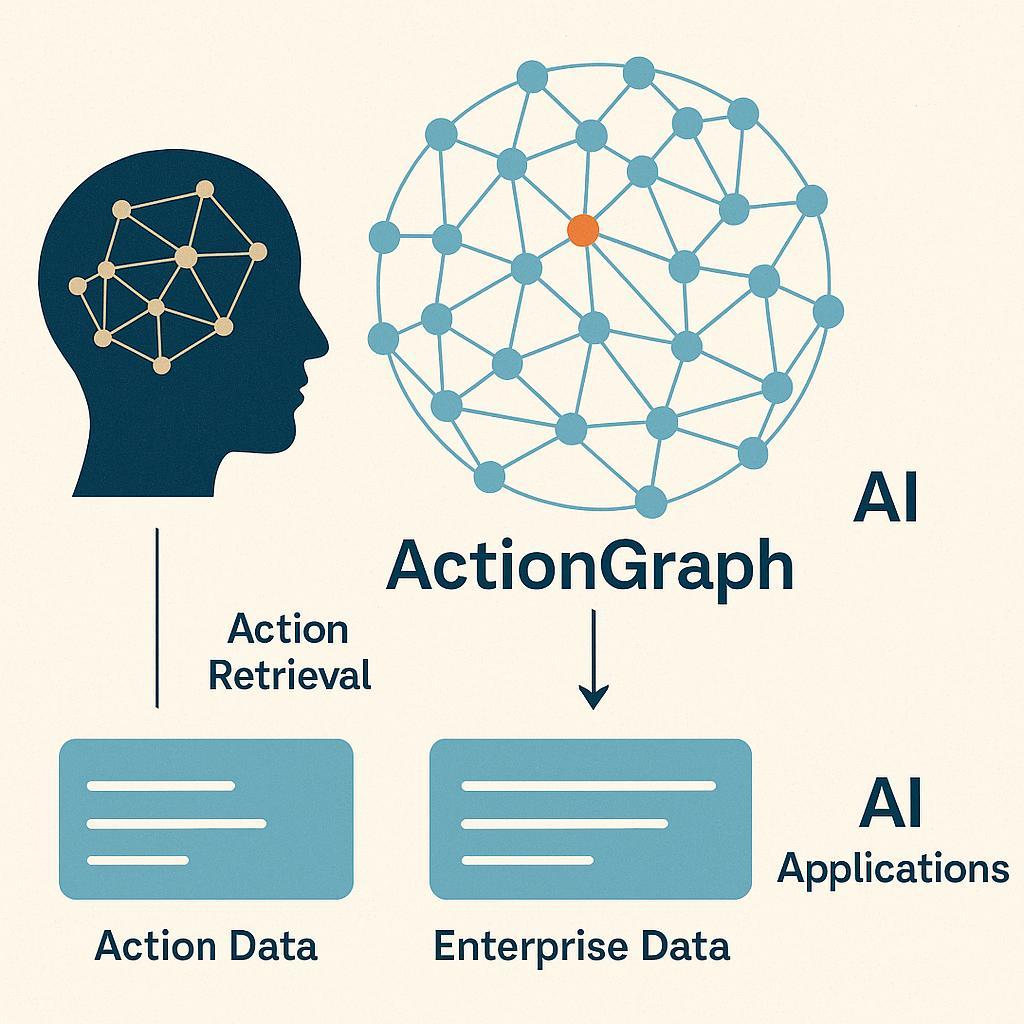
How does ActionBoard’s AI find the information it needs, exactly when it needs it? The secret is our Dual Retrieval System, a fancy term for a simple but powerful idea: we use two complementary methods to fetch knowledge – one from structured data (the ActionGraph we discussed) and one from unstructured or textual data (think documents, chat history, notes). By combining them, the AI “thinks” in stereo, so to speak, pulling answers from the best of both worlds. This dual approach is key to achieving the true intelligence we’ve been touting, because it ensures the AI has both the precise, factual grounding of structured knowledge and the flexibility and richness of broader information. Let’s break down how it works and why it’s so effective.
Imagine you have a question: “What’s the status of our Q3 Marketing Campaign and are there any risks?” Answering this thoroughly means checking the project’s tasks and metrics (structured info) and possibly scanning meeting notes or comments for nuance (unstructured info). ActionBoard’s dual retrieval handles this seamlessly. First, the Graph Retriever queries the ActionGraph: it might traverse the graph to find all tasks under “Q3 Marketing Campaign,” see which are completed, which are pending, and identify any that are flagged as delayed or dependent on delayed items. This gives a concrete factual snapshot (e.g., 8 of 10 tasks done, 2 running late, risk node attached to one task). At the same time, the Vector Retriever swings into action on unstructured data: it converts your question and all relevant documents/notes into highdimensional vectors and finds semantically relevant text. Perhaps last week’s meeting minutes mentioned a potential risk about ad spend or a client comment indicating concern. The vector search might pull a snippet like, “Client X expressed concern about timeline for Campaign deliverables in last call,” which isn’t a structured field anywhere, but is valuable context.
The magic happens when we fuse these results. ActionBoard’s AI merges the hard data from the graph with the soft insights from text to give you a comprehensive answer: “Campaign is 80% complete (8/10 tasks). Two tasks are behind schedule (design rollout, copy review), which puts the final launch at risk medium.com. Notably, in the latest client call, client expressed concern about the timeline. Recommend reallocating design resources to catch up.” The inclusion of that client call detail makes the answer far richer – and it was pulled via vector retrieval from unstructured notes. The structured part made sure the factual status and task list were accurate. Neither approach alone would be as good; together, they provide a complete picture.
Why did we adopt this dual method? Because research and our own trials showed that it dramatically improves performance and reliability of AI responses. One recent innovation in AI, described as a graph-based retrieval augmented system, saw up to 86.4% better performance in answering complex queries when combining a knowledge graph with traditional retrieval medium.com. In our internal tests, we observed similar leaps in quality. The knowledge graph (ActionGraph) reduces irrelevant info and grounds the AI in the exact project data, cutting down the “token bloat” by orders of magnitude (one study reports a 99% reduction in tokens needed by using graphs to focus the AI medium.com). Meanwhile, the vector search ensures nothing important in free-form text is missed – it’s our safety net for context that isn’t neatly filed in database columns.
Another massive benefit is reducing AI hallucinations. Hallucinations are when an AI just makes stuff up because it doesn’t actually know the answer but tries to guess. By always checking the ActionGraph, our system has a built-in fact-checker. If the AI tries to say “All tasks are on track” but the graph says two are delayed, the system cross-corrects. There’s compelling evidence that this kind of ensemble approach slashes error rates. In one case study, using a knowledge graph alongside standard AI retrieval cut the AI’s misinformation (hallucination) rate from 22% down to 5% arxiv.org. We’ve observed similarly that ActionBoard’s answers about project status or recommendations align with reality far more often than a naive AI bot plugged into your data would. The graph component enforces a level of truthfulness, while the vector component provides nuance and breadth.
So what exactly is the vector side searching? It could be project descriptions, task comments, team chat logs (if integrated), requirement docs, essentially any textual data you’ve allowed ActionBoard to index. We use state-of-the-art embedding models (yes, the same kind of tech behind GPT’s understanding of language) to transform those documents into mathematical vectors that capture their meaning. When you ask something or when the AI needs extra context, it transforms the query similarly and finds which documents have the closest vectors – meaning they’re talking about related topics. This way, even if you phrased something differently (“Any concerns about Q3 campaign?” vs “risks for Q3 campaign”), the semantic search can find relevant info (maybe a note that says “issues for marketing project” would still be found). The beauty is, this doesn’t require you to perfectly tag or organize all your documents; the AI can infer relevance by meaning.
On the structured side, our system uses graph query languages (like a form of Cypher or GraphQL) to extract exactly the data needed. For instance, it might run a query: “Find all tasks in Project X with status = delayed or dependency on delayed” to quickly pinpoint problem areas. Or “fetch all tasks assigned to Alice due this week” if you ask a question about Alice’s workload. These structured queries are lightning-fast and precise – no ambiguity there. It’s like asking a database a question and getting an exact answer. The AI then contextualizes that answer in human-friendly form and augments it with any relevant narrative from the unstructured side.
A concrete example from a user’s experience: A product manager asked ActionBoard, “What did we decide about the beta release timeline in our last meeting?” The answer she got was impressive. The system pulled the decision from the meeting notes (“Team agreed to push beta release to October 15th to accommodate extra testing”) via vector search, and it cross-referenced the project’s timeline in the ActionGraph, updating the response with “this is a 2-week delay from the original plan, and will shift the final launch milestone accordingly.” The combined answer saved her from digging through notes and manually recalculating timelines. It was all there in one response, and importantly, grounded in actual data and records. This illustrates the synergy: the notes alone wouldn’t remind her about the impact on the final milestone, and the graph alone wouldn’t know the reasoning discussed in the meeting. Together, she got the full story in seconds.
From a system design perspective, orchestrating this dual retrieval was non-trivial. We had to build what we call the Fusion Module that takes the graph results and the vector results and merges them intelligently. It’s not just a copy-paste; it often involves ranking which info is most important, reconciling any discrepancies, and forming a coherent narrative. In many ways, this fusion module is like a mediator between a very strict librarian (graph) and a creative researcher (vector) – it listens to both and decides the best answer. When done right, users shouldn’t even realize there were two separate retrieval processes; they just get one useful answer.
The impact of this approach on user experience has been profound. Users feel like the system “just knows” their project context intimately (that’s the graph at work) and also remembers all the conversations and documents (that’s the vector search at work). One could almost liken it to the left brain-right brain analogy: one side logical and structured, the other holistic and languageoriented. By having both, ActionBoard’s AI is well-rounded.
We’re not the only ones excited about this; the tech community is abuzz about hybrid AI systems. Gartner, in fact, emphasizes that such people+machine collaborative approaches are the key to the future projectmanagement.com – and we extend that to** machine+machine collaboration** (different AI techniques helping each other) as a key to AI’s future. The dual retrieval system is our implementation of that ethos.
With this inside look, you now know how ActionBoard’s intelligence operates on a technical level: an ActionGraph providing structured context, a dual retrieval system fetching both graph data and unstructured info, and a fusion process delivering coherent insights. In the next blog, we’ll have a conversation with the architect of these systems – the lead engineer behind ActionGraph and dual retrieval. He’ll share the challenges faced and the breakthroughs achieved in building this platform. If you’re curious about the human effort and vision that made these AI features a reality, you won’t want to miss it